Handoff guide
Welcome to your handoff guide. This page will walk you through how to remix your website, connect your domain, understand your analytics, and start driving leads.
handoff guide parts.
Part 1
Remix Your Website
To take ownership of the site, you will need to remix the project into your own Framer account. Once that is done, you can upgrade your plan, connect your domain, publish the site, and manage everything from your side.
Step 1
Open the Framer remix link provided to you.
Step 2
Log in to your Framer account or create one if needed.
Step 3
Click Remix to add the project to your workspace.
Step 4
Review the website and confirm everything appears correctly.
Step 5
Once remixed, the website is now in your account and ready for setup.
Part 2
Choose Your Plan and Connect Your Domain
If you do not already have a domain, our partner Framer provides a free domain for one year with any yearly plan you choose.
A connected custom domain makes your business look more professional, more trustworthy, and more established. Your domain is the address people will use to find your business online, so it should reflect your brand clearly.
Step 1
Open Project Settings and navigate to the Domains tab.
Step 2
Enter your custom domain and click the checkmark.
Step 3
Wait for Framer to check if your provider supports autoconnect.
Step 4
Click Autoconnect if the blue button appears
Step 5
Authorize the connection through your domain provider's prompt.
Step 6
Manually update DNS records if autoconnect is not supported.
Step 7
Refresh the domains tab in Framer to confirm the connection.
Step 8
Verify your site by visiting your custom domain in a browser.
Part 3
Review Before Launch
Before you publish your website and begin sending traffic, take a moment to complete a final review. This helps ensure everything is aligned with your brand and ready for a smooth launch.
Part 4
Understand Your Analytics
Analytics show you how people are interacting with your website. They help you understand where visitors come from, what they click, and whether your site is turning traffic into leads.
Analytics is best used to understand traffic, visitor behavior, top pages, and referral sources. Lead-specific actions such as form submissions should be reviewed separately through your form notifications or connected tools.
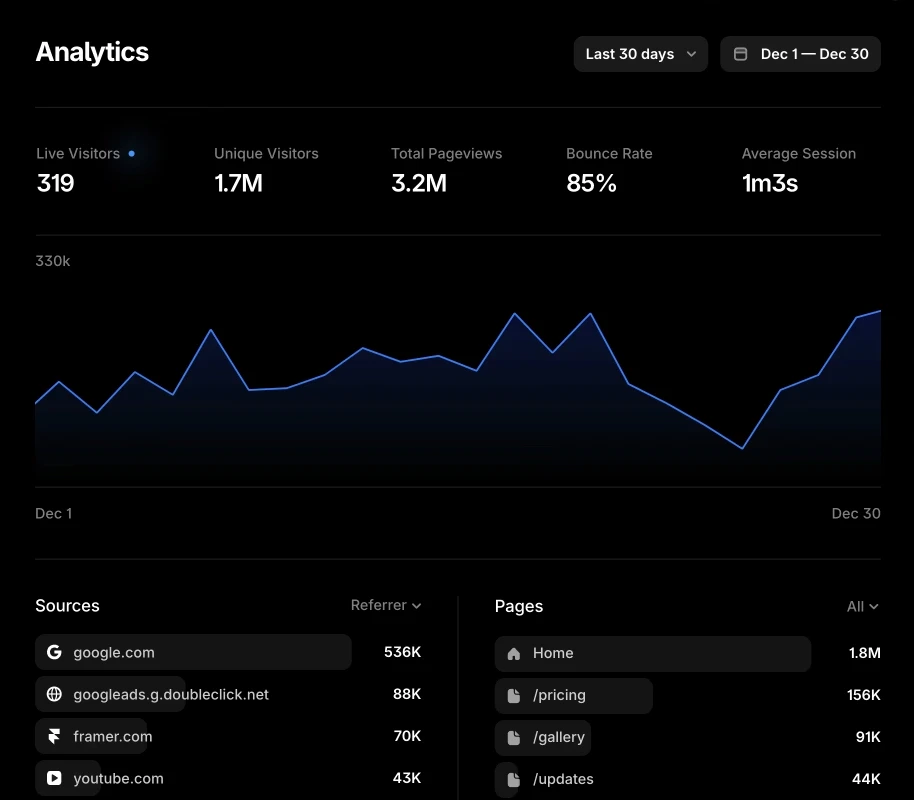
Live Visitors
The number of people currently active on your website.
Unique Visitors
The number of individual visitors who viewed your site.
Total Pageviews
The total number of pages viewed across your website.
Bounce Rate
Visitors who leave the site without continuing to another page.
Average Session
The average amount of time visitors spend on your website.
Sources
where your traffic is coming from such as social platforms.
Pages
Shows which pages are receiving the most visits across your website.
Use your analytics to spot patterns over time.
Part 5
Getting Leads
A well-built website does more than present your business. It builds trust, nurtures potential customers, filters out low-intent leads, and helps turn attention into real opportunities. To begin generating leads consistently, your website needs qualified traffic, usually through paid ads, organic marketing, or a combination of both.
Part 6
Paid Ads
Paid ads are one of the most effective ways to send qualified traffic to your website.
They allow you to reach the right audience faster, create demand at scale, and drive visitors who are already more likely to take action. In many cases, ads are what turn a website from an online presence into a real lead generation asset.
Minimum setup
Meta Pixel
Lead event
Test Events
Domain verified
Recommended Meta setup
Everything in Minimum setup
Conversions API
Pixel + CAPI deduplication
UTM tracking
GA4 for measurement
Part 7
Organic Traffic
Organic traffic helps support long-term growth, trust, and brand familiarity.
Content, referrals, social media, and search can all bring valuable visitors to your website, especially when your messaging is clear and your offer is relevant. While organic traffic often takes longer to build, it can strengthen your overall marketing and reduce reliance on a single channel.
Recommended Organic setup
Meta Descriptions
Social media
CMS SEO Content
Email marketing
Google reviews
Referrals
Nuoset handles most of the minimum organic setup for your website.
Part 7
Future Updates
Once your site is inside your Framer account, you will have full control of your website and you will be able to make updates as needed.
For more advanced edits, redesigns, new sections, or conversion improvements, ongoing support is recommended.
Part 8
Final Section
Your website is now ready to be remixed, published, and used as a lead generation asset for your business. A strong website works best when design, traffic, and conversion strategy all support each other.
For any questions, support, or plan upgrades, please contact us.